Tekion is an automotive cloud-based Dealership Management System (DMS) that provides a unified
experience across every department in a car dealership.
Scheduling/Appointment product vertical (also called Digital Service Experience) allows dealerships
to create & manage appointments, check-in and manage communication with customers.
Efficiency in navigating & updating 1 capacity change, down from 30 min to
under 5 min
~74%
Adoption amongst Service Directors, Managers & Advisors
4 weeks to 2 weeks
Setup to operational peak time
02Kickoff & Open Questions
I discussed the problems facing the current application and the needs of its users with the PM as part
of the kickoff. We identified 3 initial challenges.
I had some questions and gaps of my own that I
tried
to resolve with various research methods as part of my design process.
Challenges raised at kickoff
One daily cap covered the whole dealership — the only limit it could express.
It ignored the resources a booking actually draws on: advisors, BDC agents, transportation,
shops.
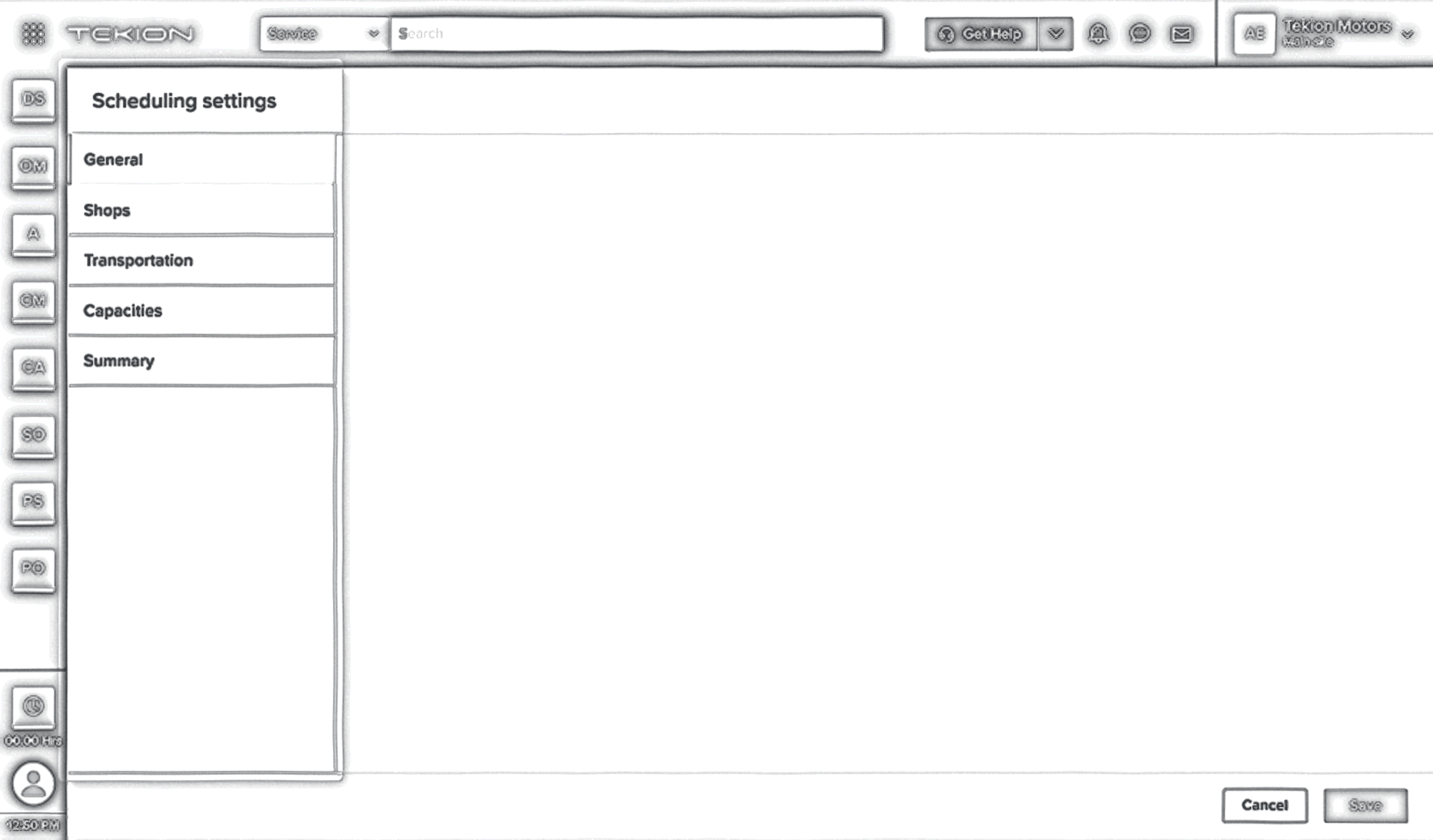
Users could not find where to set that limit due to deep nesting of settings
Open questions after it
How does it work today, and where are its gaps?
Application audit · Discussions with PMs
Who are the users across the whole process?
Journey mapping · Persona analysis
Where do they expect this to live in our system?
Discussions and validations with PSMs
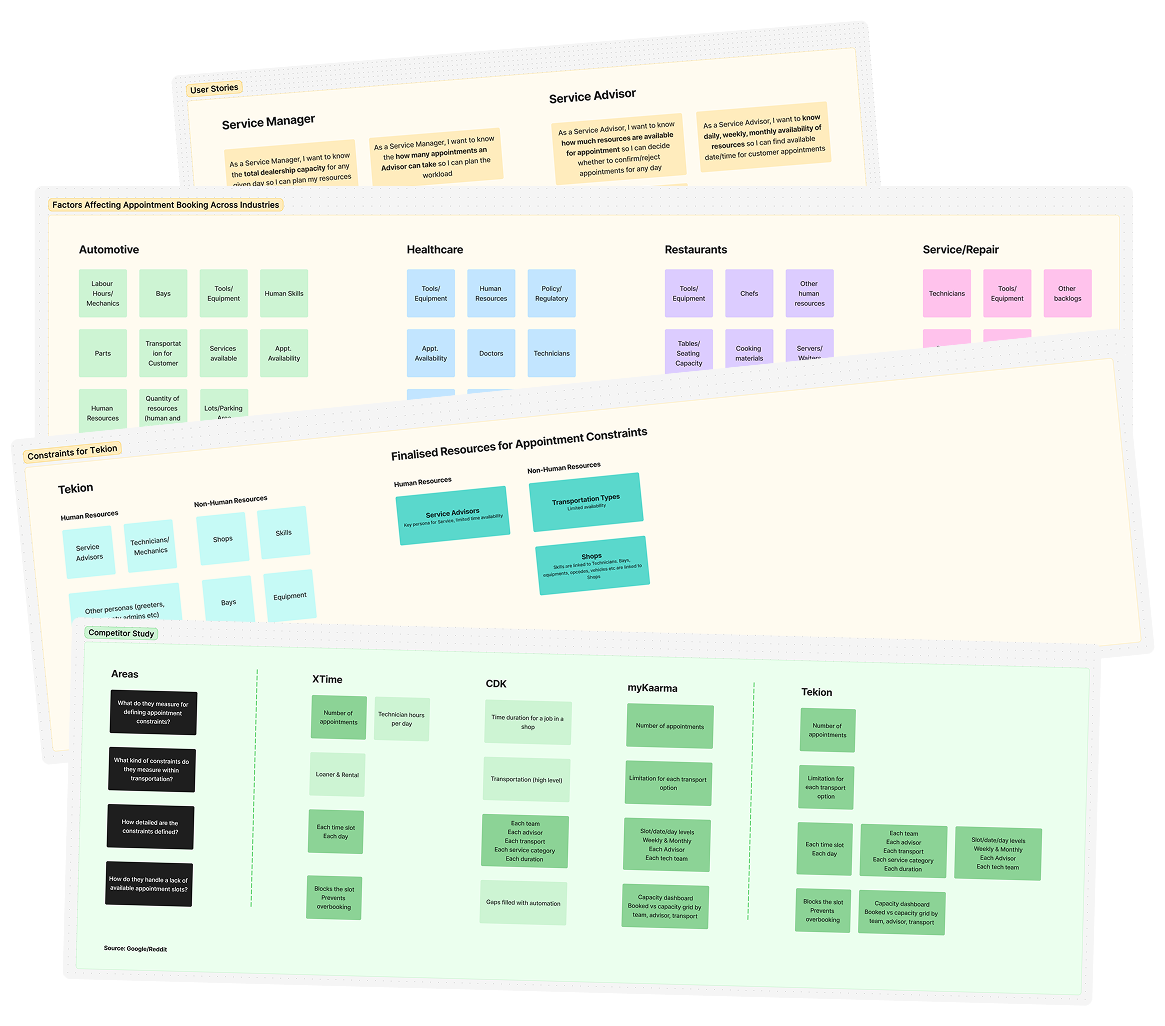
What factors affect appointment booking?
Secondary research
How do others solve this, inside and outside automotive?
Competitor analysis · Secondary research
03Design Process, Research &
Insights
The open questions mentioned earlier guided the research methods as part of this project's design
process. The insights gathered became the bedrock of explorations, eventually converging towards the
shipped designs.
Define
Brief → Scope
Identified knowledge and requirements gaps
Re-defining the problem
Validated the issues, scale, identified user personas & agreed scope with PM
Design & ship
Explorations
Explored 2-3 ideas for each level of design decision making
Final designs
I designed interactions, user-flows, edge cases including downstream impacted flows.
Pre-launch
Updated designs after analysing internal & customer feedback from PMs, PSMs, Others.
Learn & fix
Post-launch
Analysed user feedback via LUS, Support Tickets
Phase 2
Roadmap planning in progress
03.1Who are we designing for?
I mapped out a compact user-journey of the appointment booking & setup process. This helped me
identify 4 key sets of users. In the end, we decided to design primarily for Service Department
Leadership while taking into account the impact on other users.
Service Department Manager/Director
Makes workflow decisions for the Service department at the dealership
Service Advisor
Keeps the shop running with an efficient flow from check-in to delivery
BDC Agent
Book appointments, confirm appointments, and reach out to customers due for maintenance
Customer/End user
Get an appointment without a long hold or back-and-forth, ideally outside business hours
03.2What did we learn after the research?
Based on the research, discussions with PMs and other stakeholders, we agreed and narrowed down the
scope to these pillars. The ideas, design explorations and eventually the final designs incorporated
these insights.
Users
Primary Users
Service Managers & Directors Service Advisors
Secondary Users
BDC Agents
Indirect Users
Customers/End-Users
Resources
Service Advisors
Key persona for service, limited time availability
Transportation Types
Limited availability
Shops
Limited servicing capability, other resources linked to shops
Mechanisms
Maximum no. of appointments
Time slots per day/week & for each resource
System enforced prevention of overbooking
Capacity visibility
04Explorations & Key Design Decisions
The overall challenges faced by dealerships and users was multi-fold. We had to break down the
complete scope into levels and make design decisions for each level.
Where should the settings live?
Hardcoded values
Not scalable even within a dealership and across multiple
dealership customers
No flexibility for Service Managers to make quick changes
Discarded
Standalone capacity settings
Not reasonable to build new setup applications
Higher engineering and maintenance costs
Not recommended to build a single-use settings app for a very
specific use-case
Discarded
Modify/redesign scheduling settings
DSE is an existing SKU that includes a Scheduler + Scheduling Settings.
Service Managers’ mental model already expects the 2 to be tied together
Users need visibility and quick access for everything
Selected
How users navigate & find relevant settings?
Option A – Adding ‘Capacities’ section in
existing application
Pros
Lowest engineering effort
Cons
High cost of discoverability
Inefficient navigation between resources and capacities
High interaction cost of back & forth navigation & editing
Discarded
How users navigate & find relevant settings?
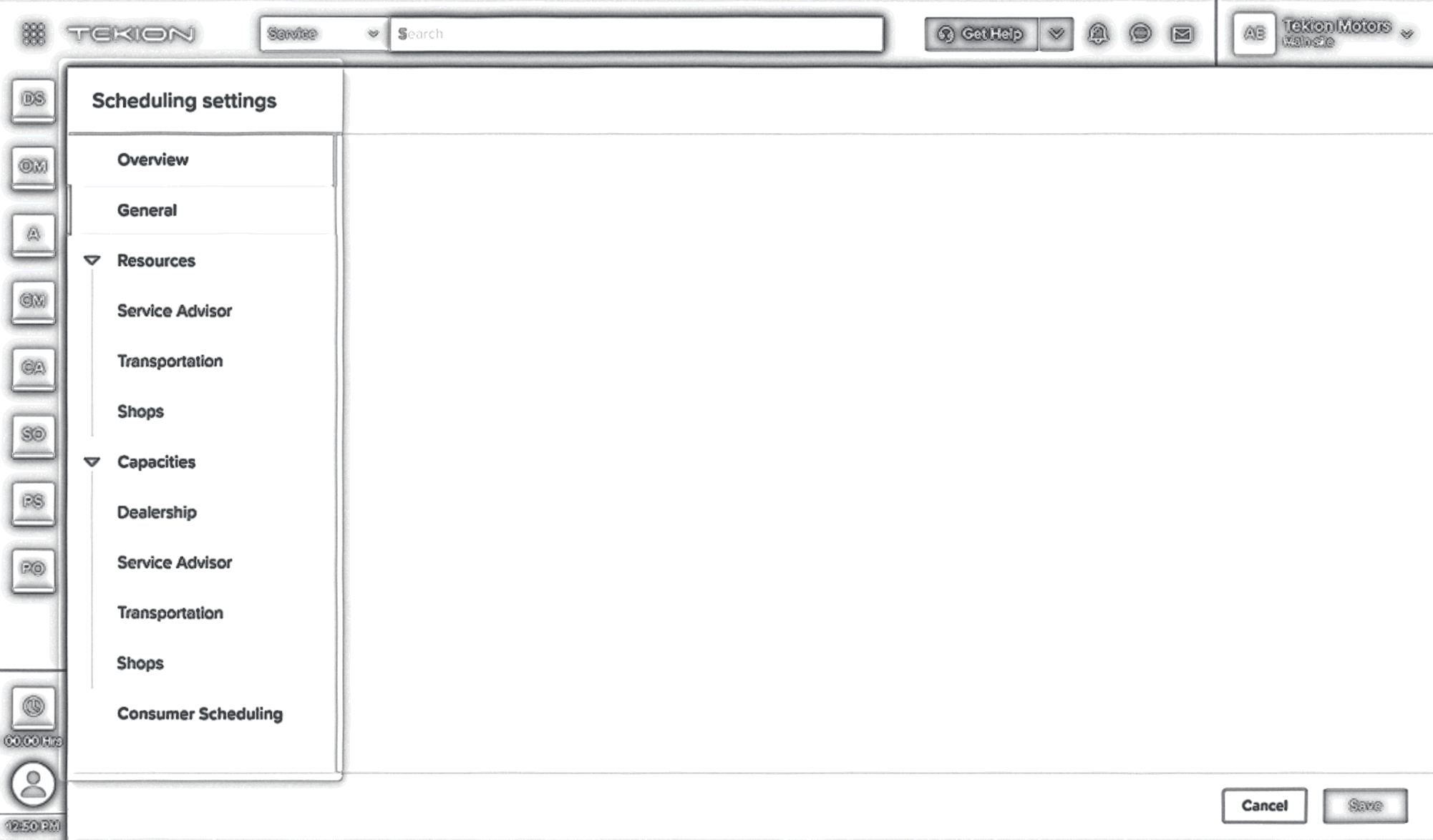
Option B – Separate resources & capacities
settings
Pros
Better discoverability of resources & capacities
Easier back & forth navigation between resources & capacities
Easier accessibility for granular settings
Lower interaction cost long-term
Cons
Highest engineering effort
Slightly higher learning & training costs
Selected
How Flexible or Granular the configuration should be?
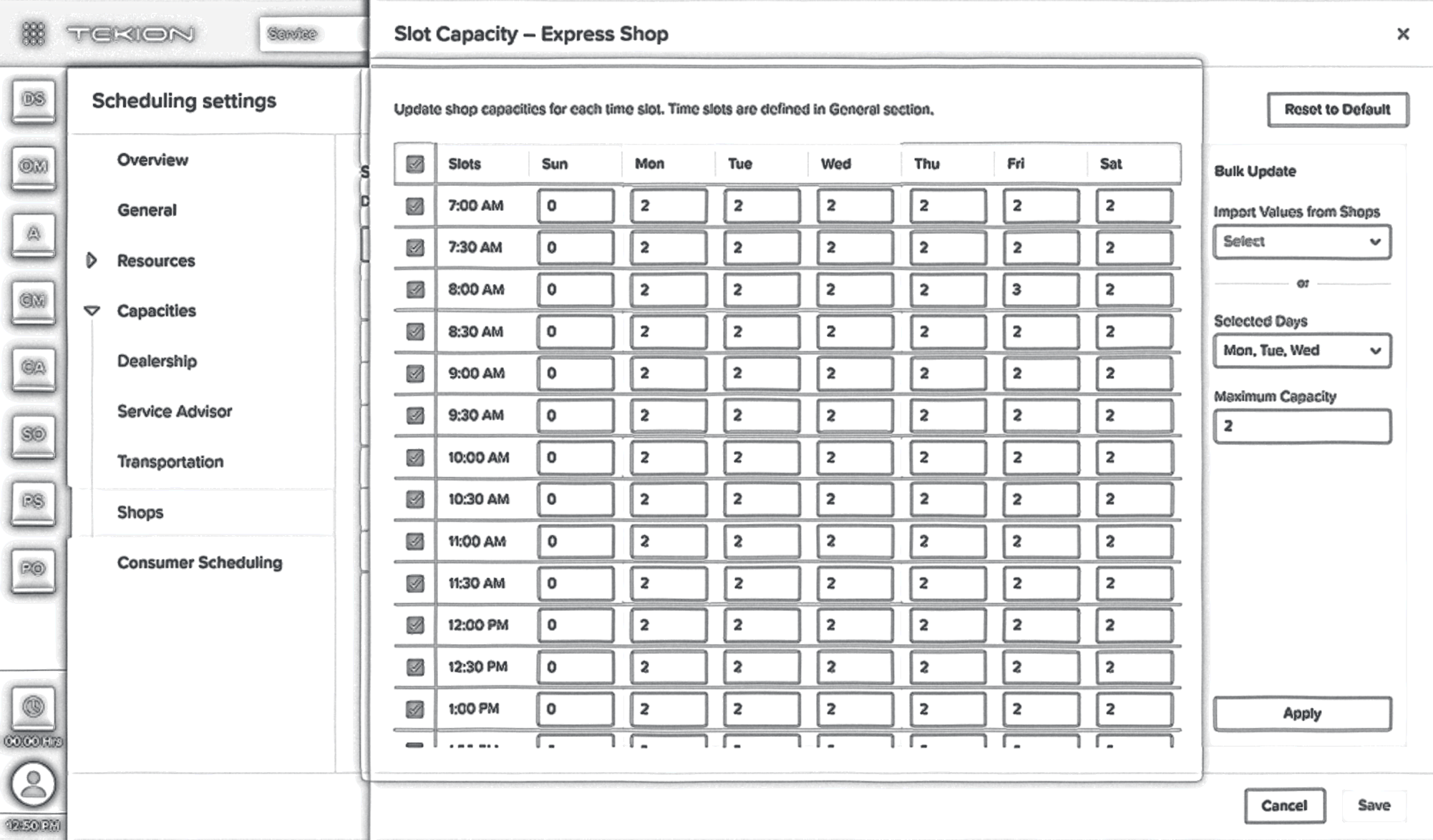
Option A – Slot/Hourly Capacities
Pros
Ability to assign daily maximum appointment limit for each resource
Ability to assign hourly appointment limit for each resource
Bulk actions for easier setup
Cons
Highest engineering effort
Higher initial learning & training costs
Selected
05Testing, Feedback & Final Designs
We tested the designs with both internal stakeholders and some users. Based on the feedback, I updated
the
designs to add some features and fix some missed ones before development work started.
Add bulk update for slot capacities
Time blocks in Advisor schedules to account for holidays, lunch breaks etc.
Adding & authorising BDC Agents for booking appointments
Error/warning states when changing time slots
Final design walkthrough — daily capacities for Service Advisors and Shops, and slot
capacities set in bulk
06Outcome
06.1Qualitative Impact
After the launch, we received customer feedback via PMs, PSMs and other stakeholders.
This feedback was largely positive, with some feedback indicating that customers needed some help getting
up to speed.
We began updating our Service Schedule Settings to provide greater efficiencies, less advisor
stress, and an overall better guest experience. I was very impressed with the ability to
customise scheduling by advisor, days, time slots, labor op’s and etc.
Service Director, Everett Chevrolet
Please let me start by saying ‘THANK YOU’ for your teams recent updates in the
appointment system with regards to capacity settings. The system is now both user friendly
and convenient to edit and form around out [our] store.
FixedOps Director, SERRA Chevrolet-Buick-GMC
As time has gone by and we’re more familiar with the system, we’re now looking for ways
to utilise Tekion’s technology… And from beginning to end we rebuilt our entire
scheduling setting in less than two weeks.
Service Director, Everett Chevrolet
At first glance, *** at *** was very excited with the new capacity settings and daily
capacity adjustments in appointment screen. He said this is exactly what they wanted and
their top scheduling requests! I told them to fully test it over the next week for more feedback
but initial reaction is very good.
Partner Success Manager, via Slack
Source: Feedback collected by Product Managers, Product Specialists and Customer
Success teams via Slack messages, emails, calls etc.
06.2Quantitative Impact
I used some internal applications to view and analyse Support Tickets, Customer complaints etc. I also
looked at user session recordings via Pendo Analytics.
83%
quicker in making & applying a single capacity update, down from
30 min → 5 min
~75%
reduction in steps to access capacities
(eg. transportation from 4 actions → 1 action)
~74%
adoption amongst Service Directors, Managers & Advisors
3-6 months after launching the update, there are some gaps that users mention quite often. Unfortunately,
these have not been planned for any roadmap, yet.
8%
of all Scheduling/Capacity related tickets are about training/self-usage
issues.
14%
of all Scheduling/Capacity related tickets are about changes not taking effect
immediately without an explicit action to ‘Run Scheduler’.
14%
issues related to gap between Capacity integration with Consumer
Scheduler compared to ARC.
Source: Live user sentiment & support ticket analysis
07Reflection
07.1No bad ideas
Ideate as much as possible without worrying about engineering or other constraints. Every idea leads to
the destination.
07.2Understand and negotiate constraints
Discuss constraints with engineering, product and other stakeholders beyond typical org structure and
processes. These discussions and collaborations lead to better solutions.